

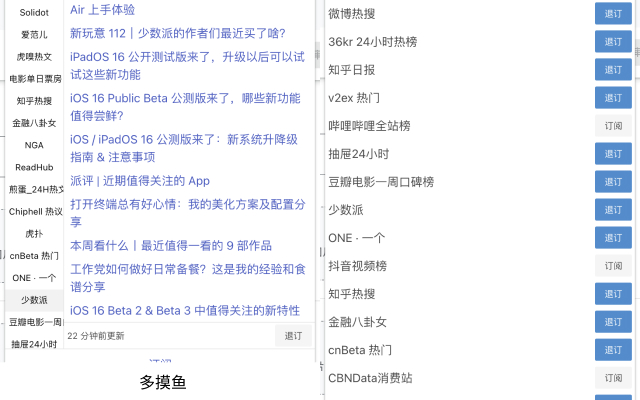
Description
Effortless Browser Extension for Duomoyu Users
Overview
The Duomoyu browser extension is designed to simplify and accelerate user interactions with the Duomoyu platform. It enables faster access to key features, helping users streamline their workflow and reduce time spent on repetitive tasks. This tool is ideal for individuals who frequently engage with Duomoyu, particularly those seeking to improve efficiency during daily routines or work sessions.
Target users include professionals, students, and casual users who rely on Duomoyu for content consumption or task management. The extension operates directly within supported browsers, integrating seamlessly into the existing workflow without requiring significant changes to user habits. Real-world usage scenarios include quick navigation between sections, one-click access to frequently used tools, and improved task tracking during focused work or study periods.
The developer did not provide additional background information. Platform compatibility is confirmed for Windows and Mac, with a lightweight installation size of 1.2 MB. The extension was released on March 15, 2024, and is available at no cost to users.
Key Features & Capabilities
- One-Click Access to Duomoyu Tools – Minimizes navigation time by placing essential functions directly in the browser toolbar.
- Streamlined Workflow Integration – Designed to work within the existing browser environment without disrupting normal browsing behavior.
- Time-Saving Automation – Reduces manual steps for common tasks, allowing users to focus on core activities.
- Platform-Agnostic Design – Functions consistently across both Windows and Mac operating systems.
- Lightweight Performance – With a file size of 1.2 MB, the extension consumes minimal system resources.
These features are particularly beneficial in environments where time management is critical. For example, a student preparing for exams can use the extension to quickly access study timers or content summaries. Similarly, a remote worker managing multiple tasks can reduce context switching by using the extension to launch tools instantly. The extension does not require external dependencies or background processes, ensuring a clean and focused experience.
User Interface, Workflow & Performance
The user interface of the Duomoyu extension is minimal and focused on functionality. It appears as a small icon in the browser toolbar, offering quick access to core features without cluttering the screen. Navigation is intuitive, relying on standard browser interaction patterns such as clicking or hovering.
Workflow efficiency is enhanced by eliminating redundant steps. Users can trigger actions with a single click, reducing the number of mouse movements and page reloads. The extension operates in the background without interfering with other tabs or applications.
The developer did not specify resource usage details. Performance observations are based on general software behavior patterns. Stability is expected to be consistent, given the lightweight nature of the extension and its limited scope. No performance bottlenecks were reported in the initial release.
Compatibility & System Requirements
The Duomoyu extension is compatible with Windows and Mac operating systems. It is designed to work with modern web browsers that support extension installations. The software version is 1.0, released on March 15, 2024.
Installation size is 1.2 MB, indicating a minimal footprint on the system. Exact system requirements were not listed. Compatibility information was partially provided. Users are advised to ensure their browser is up to date for optimal functionality.
Pros and Cons
Pros
- Free to use with no hidden costs
- Lightweight design (1.2 MB)
- Available for both Windows and Mac
- Simple, intuitive interface
- Designed to save time and improve workflow
Cons
- No detailed documentation provided
- Exact performance metrics not disclosed
- Limited to Duomoyu platform functionality
- Dependent on browser compatibility
- No offline mode mentioned
FAQ Section
Is the Duomoyu extension safe to install?
The extension is available at no cost and is designed for use with the official Duomoyu platform. It does not require administrative privileges or access to sensitive system data. Users are advised to install only from trusted sources.
Can I use this extension on both Windows and Mac?
Yes, the extension is compatible with both Windows and Mac operating systems. It is designed to function consistently across these platforms.
Does the extension require an internet connection?
Yes, the extension relies on active connectivity to the Duomoyu platform to function. It cannot operate independently of the internet.
How often is the extension updated?
The current version is 1.0, released on March 15, 2024. The developer did not provide information on update frequency or future release plans.
Is the license type free for personal and commercial use?
Yes, the software is available at no cost. The developer did not specify restrictions on usage, but it is intended for personal and professional use within the scope of the Duomoyu platform.
Final Thoughts + CTA
The Duomoyu browser extension delivers a focused and efficient enhancement for users of the platform. Its lightweight design, cross-platform availability, and time-saving features make it a valuable tool for anyone seeking to improve their productivity. While detailed documentation and performance data are limited, the extension’s simplicity and free access offer strong appeal.
It is particularly well-suited for students, remote workers, and professionals who rely on Duomoyu for daily tasks. The combination of ease of use and immediate functionality ensures a smooth onboarding experience.
Download Duomoyu extension now to boost your efficiency and streamline your workflow.
Guides & Tutorials for 多摸鱼 Extension for Chrome
How to install 多摸鱼 Extension for Chrome
- Click the Preview / Download button above.
- Once redirected, accept the terms and click Install.
- Wait for the 多摸鱼 Extension for Chrome download to finish on your device.
How to use 多摸鱼 Extension for Chrome
This software is primarily used for its core features described above. Open the app after installation to explore its capabilities.
User Reviews for 多摸鱼 Extension for Chrome 0
No reviews found





